Average Team & Player Position
A Python visualisation showing where each player operates on average during a match — revealing team shape, individual roles, and the defensive-to-offensive balance of any lineup.
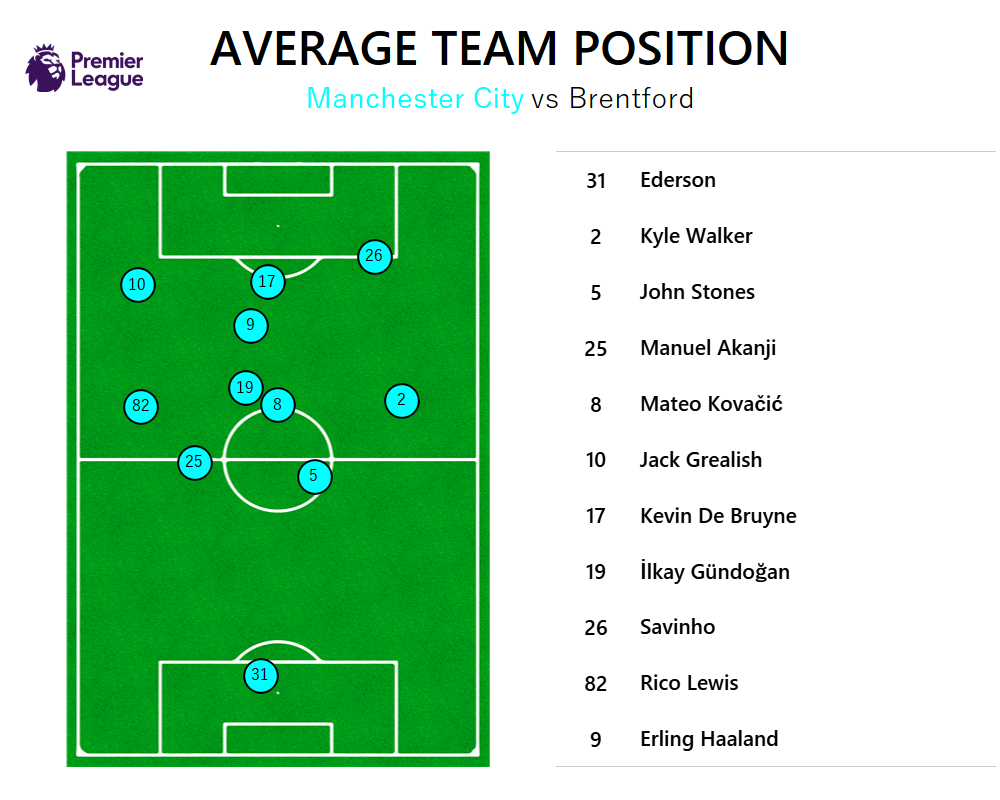
Overview
Average position plots are one of the most intuitive ways to communicate a team's tactical shape. By averaging each player's x/y coordinates across all their on-ball touches during a match, you get a clear picture of where they physically occupy the pitch — and how the team organises itself in and out of possession.
This project pulls Statsbomb event data for a selected match, computes average positions for all starting players on both teams, and renders a clean, publication-quality pitch visualisation using mplsoccer.
What the Visualisation Shows
- Team Shape: The plotted positions reveal the team's formation as it actually played — which often differs from the stated starting lineup, particularly for pressing-heavy or positionally fluid sides.
- Individual Roles: Player nodes sized by touch count or pass volume highlight which players were central to build-up play versus peripheral in possession phases.
- Defensive vs. Offensive Balance: The vertical spread of average positions shows how high or deep the team's defensive and attacking lines sat — a key indicator of overall tactical shape and pressing intensity.
Technical Implementation
Data Retrieval
Match event data is fetched from the Statsbomb open data API using statsbombpy. All pass, carry, and shot events containing player location coordinates are extracted.
Position Calculation
For each player, the mean x and y coordinates across all their on-ball events are computed — producing a single average position representing their typical operating zone during the match.
Pitch Rendering
mplsoccer's Pitch class is used to render a styled football pitch, with player nodes plotted at their average coordinates and labelled with name and number. Team colours and styling follow the selected clubs' identity.
Explore the Project
Watch the walkthrough on YouTube or browse the code on GitHub.